
Scrcpy is the usual first recommendation when you want an Android phone on a Windows PC. It is free, it does not need root, and over USB it is fast. It mirrors the screen and lets the computer keyboard and mouse control the device. What it does not give you is a layout for touch games. Fire, scope, and the movement stick are buttons drawn on the phone. People looking for a scrcpy alternative, or for scrcpy key mapping, are usually stuck on that layer.
MirrorPlayer is a Windows app for that job. You mirror the real phone, then place keys on the live picture. You do not type a scrcpy command. This guide covers when scrcpy or QtScrcpy is still the better tool, then walks from the first USB connection to pressing ~.
What scrcpy already does well
Scrcpy, maintained by Genymobile, is free and open source. It runs on Windows, macOS, and Linux. The phone does not need root, and the basic mirror does not leave a resident app behind. USB is the stable path. Wireless works after a TCP/IP setup. Public documentation describes about 30–120 fps and roughly 35–70 ms of latency. On Android 11 and newer it can forward audio. It can turn the phone screen off while mirroring, and it can record the session. Physical keyboard and mouse modes cover typing and ordinary taps.
Scrcpy remains the right tool if you want any of these:
- macOS or Linux, not only Windows
- A terminal workflow and scripts
- Virtual display, camera mirroring, or the other developer controls that ship with scrcpy
Those are scrcpy features. They are not restated below as MirrorPlayer features.
Where game key mapping gets awkward
Stock scrcpy keyboard modes, including UHID physical-keyboard simulation, solve typing and clicks. They do not lay WASD onto the on-screen joystick, or pin fire and scope to the HUD. A shooter still expects touch zones.
QtScrcpy is the open-source app that adds game scripts on top of that idea. You write positions in a text file, put the file in a keymap folder, refresh, apply, and press ~ to toggle mapping. Example scripts have included PUBG Mobile, and vehicle control can need a separate stick mode. It works. Lining up a joystick means editing coordinates, not dragging a pad on the live frame.
One Android limit shows up in both tools. On some Xiaomi and Redmi phones, USB debugging alone does not allow injected taps. You also turn on USB debugging (Security settings). Brand notes are in the device connection guide.
What visual key mapping means
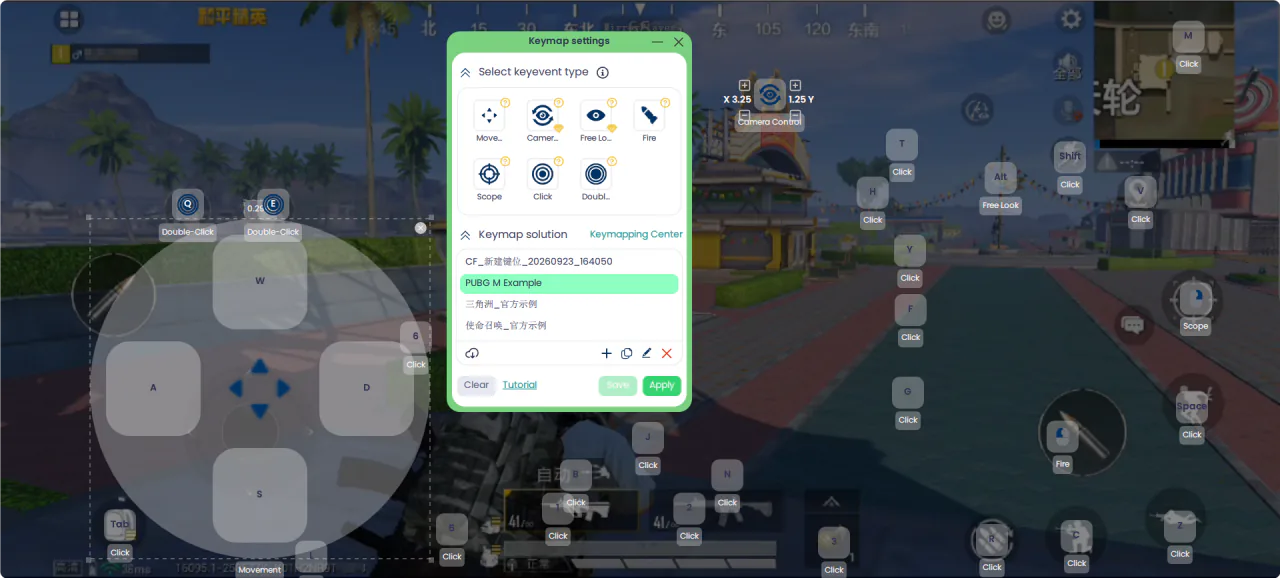
Click the mirror window and press Ctrl+K, or use Key mapping on the quick-action bar. Keymap settings opens on top of the phone picture. Drag the panel aside if it covers a button you need to place.
The type row includes:
- Move places a WASD pad. Drop it on the screen, then drag and resize it until it covers the game joystick.
- Camera turns the view with the mouse.
- Free Look is the smaller look control, often the “eye” button in battle royale games. Hold the assigned key and move the mouse.
- Fire and Scope sit on the left and right mouse buttons. You choose where they land on the HUD, not which mouse button they use.
- Click and Double-click cover jump, crouch, prone, reload, interact, and other buttons. Double-click the picture to drop one, drag it onto the icon, click it, and press the key you want.
Under that row, the profile list includes examples you can start from: PUBG M Example, 和平精英_官方示例 (Game for Peace), 三角洲_官方示例 (Delta Force), and 使命召唤_官方示例 (Call of Duty: Mobile). The names may appear in Chinese. They are starting points. If your HUD scale changed, drag the markers onto the real buttons. The PUBG Mobile walk-through is PUBG Mobile keyboard and mouse. The Game for Peace note is Game for Peace key mapping. The Delta Force walk-through is Delta Force mobile keyboard and mouse. The Call of Duty: Mobile walk-through is Call of Duty: Mobile key mapping.
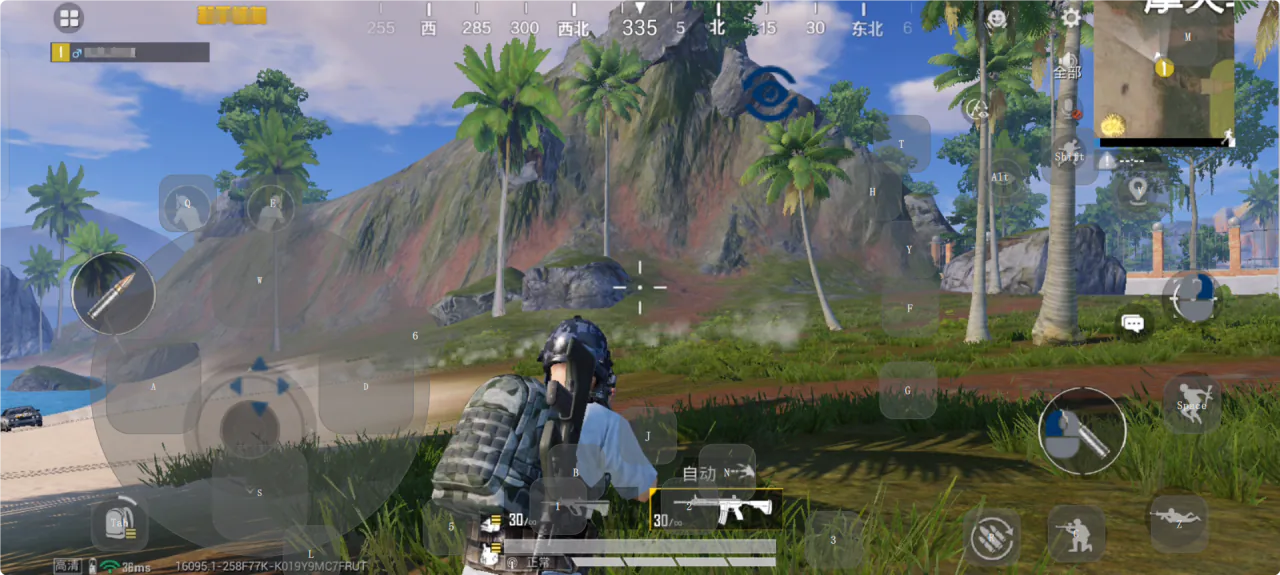
Save, then Apply. Mapping stays off until you press ~ (the key under Esc). The desktop cursor hides while mapping is on. Key hints can stay on the picture so you can see each bind. Press ~ again to pause mapping and take the pointer back. The shots below are a Game for Peace match. The keymap panel is in English.
Scrcpy, QtScrcpy, and MirrorPlayer
| scrcpy | QtScrcpy | MirrorPlayer | |
|---|---|---|---|
| Price | Free, open source | Free, open source | Free download, 3-day full trial, then a one-time license |
| Systems | Windows, macOS, Linux | Windows, macOS, Linux | Windows |
| Interface | Command line | Qt app | Desktop app, no scrcpy commands |
| Game keys | No on-screen touch layout | Text scripts, ~ to toggle | Drag on the live picture, Ctrl+K to edit, ~ to toggle |
| Connection | USB and wireless | USB and wireless | USB and Wi-Fi |
| Audio, screen-off, record | Yes; audio needs Android 11+ | Depends on the version | Audio on the PC, screen-off casting, background highlight recording |
| Latency figures | About 35–70 ms in public docs | The project has cited under 30 ms on USB at 1080p | As low as about 35 ms, up to 2K / 120 fps |
Use scrcpy or QtScrcpy for cross-platform work and scripts. Use MirrorPlayer when you want a shooter HUD lined up on Windows by dragging. Published latency numbers sit in the same tens-of-milliseconds band. USB, resolution, and bitrate change the feel more than the product name. Wi-Fi still depends on the router. See USB vs Wi-Fi.
MirrorPlayer is not an emulator. The game keeps running on the phone. Casting shows it on the PC, and mapping turns your presses into touches. It does not modify game files.
Set it up
On the phone, tap the build number seven times to open Developer options, then turn on USB debugging. On Xiaomi and Redmi, also enable USB debugging (Security settings). Some phones add Allow ADB debugging in charge-only mode. Menus differ by brand: device connection guide.
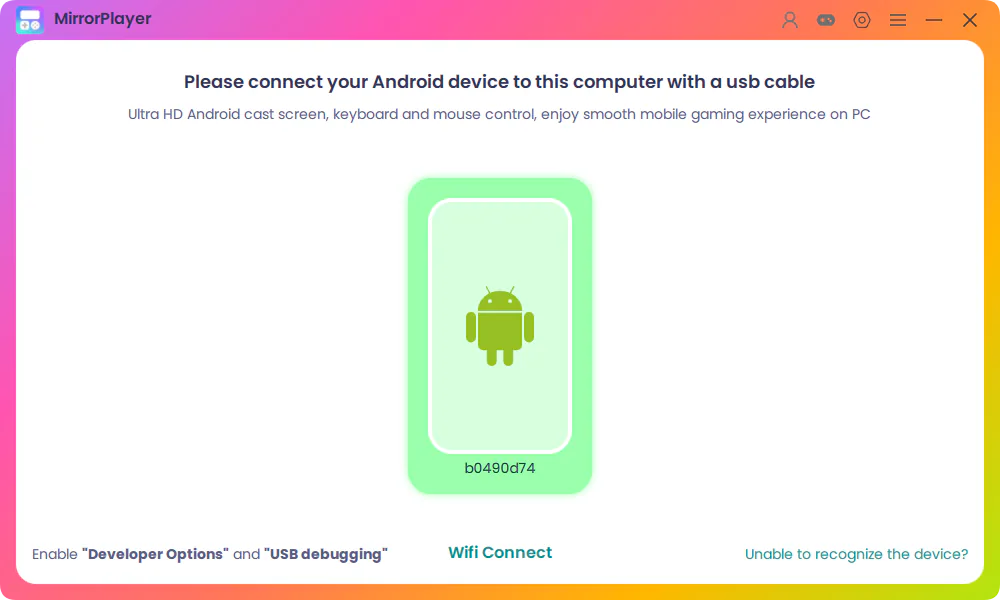
Use a cable that carries data, not charge-only. When the phone name appears in MirrorPlayer, click the Android icon to start mirroring. On the first connection, tap trust on the phone. The longer mirror walkthrough is How to mirror Android to PC.
Open the game and enter the training ground or the lobby. Leave ranked play until the layout feels right.
Click the mirror window and press
Ctrl+K.Place four controls first: Move, Camera or Free Look, Fire, and Scope. Then add jump, crouch, prone, reload, and interact with Click.
Save, Apply, and press
~. Press~again when you need the desktop cursor.Stay on USB for shooters. Use Wi-Fi after pairing, when a bit of extra jitter is acceptable.
Control-by-control steps are in the key mapping guide.
A shooter layout you can copy
| Action | Binding |
|---|---|
| Move | WASD on Move |
| Look | Mouse on Camera or Free Look |
| Fire | Left mouse button |
| Scope | Right mouse button |
| Jump / crouch / prone | Space / C / Z |
| Reload / interact | R / F |
| Sprint and skills | Shift, Q, E, number keys |
Save a second profile for vehicles. Driving uses another stick. The FPS key mapping setup goes further on sensitivity: set mouse DPI first, then in-game look speed, and change one setting at a time.
More on the same job: Keyboard and mouse for FPS and play mobile games on PC.
Publisher rules
Mapping sends your own key presses to the touch controls of a game that is already running on your phone. MirrorPlayer does not aim for you and does not edit game files. Whether a title allows a keyboard and mouse on a handheld is the publisher’s rule. PUBG Mobile has said that keyboard and mouse use on handheld devices is not allowed and can lead to a ban, and it points players who want that control scheme to GameLoop. Build the layout in training. This page explains the controls. It does not say anything about detection.
FAQ
Do I have to type scrcpy commands?
No. You connect the phone in MirrorPlayer and edit keys in Keymap settings. There is no scrcpy flag to enter.
Does it need root or an APK on the phone?
The usual path is Developer options and USB debugging. It does not require root, and mirroring does not ask you to install a companion APK.
Can I cast with the screen off, with sound, and record?
Yes. Screen-off casting, phone audio on the PC, and background highlight recording are included. Competitive sessions still prefer USB. Quality can go up to 2K / 120 fps when the phone and the link keep up. Resolution and bitrate are adjustable.
Is Wi-Fi fine for ranked shooters?
It connects. USB is the steadier choice when aim matters. The tradeoff is in USB vs Wi-Fi mirroring.
Does it run on Mac?
This setup is for Windows. If you need macOS or Linux, scrcpy is the cross-platform option.
What does the trial include?
The download is free. The full feature set runs for 3 days. After that, advanced features use a one-time license for 1 month, 3 months, or 1 year. It does not auto-renew. See pricing.
Which one to open
Keep scrcpy if you work from a terminal, or you need macOS, Linux, and the extra developer controls. On Windows, if you want fire, scope, and the movement stick dragged onto the HUD, install MirrorPlayer, press Ctrl+K, and try the layout in a training range before you queue.