
The usual way to cast Android to OBS is to open a phone window on the desktop, then window-capture that window. If the window is covered, minimized, or full-screened, the live view goes black, gets cropped, or keeps the title bar. obsmatePro hands the same picture to an OBS Media Source. Camera, frame, and alerts sit in the scene. The desktop window does not have to stay visible.
Three ways OBS can take the picture
| Source | What it takes |
|---|---|
| Window Capture | The mirror window on the desktop. Cover that window and the live view often breaks with it |
| Display Capture | The whole monitor. The phone picture and the rest of your desktop go in together |
| Media Source | The Mate Code feed. The picture is in the scene, and the phone window does not have to stay on the desktop |
Another project adds a phone source with an OBS plugin that is still in testing. That source is the plugin’s own type. obsmatePro does not add a plugin. It uses the Media Source OBS already has. This page does not install that plugin.
Connect it as a Media Source
- Connect the phone with a data cable and start casting in obsmatePro.
- Copy the Mate Code.
- In OBS, add a Media Source, uncheck Local File, and paste the Mate Code into Input.
- After you confirm, swipe the phone screen. A still picture sometimes waits for that movement.
The clicks and the black-preview check are in Add your phone to OBS with Mate Code. The first connection is in How to cast Android to OBS.
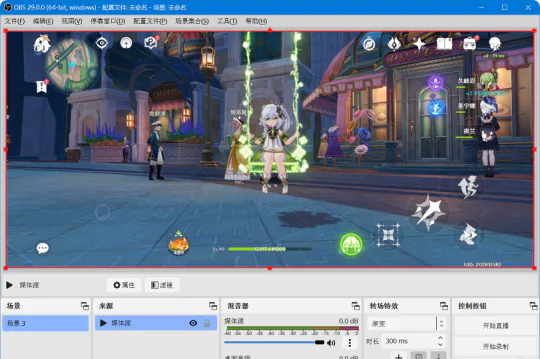
Lay out the stream after the source is in
A Media Source resizes and moves like any other source. Put the camera, labels, and alerts beside it. Window Capture cannot keep a full picture after the mirror window is minimized. Display Capture also takes the desktop you are working on.
Resolution and bitrate are in Android resolution and bitrate for OBS. Screen plus phone audio, without a capture card, is in Stream an Android phone in OBS without a capture card.
FAQ
Does the Media Source stay up if I minimize the window?
Yes. The Media Source does not depend on that window staying on the desktop. The casting session itself has to keep running.
Do I need to see the phone window on the desktop first?
You do not leave a window open for OBS. The Mate Code points at the casting session, not at a window title in Window Capture.
How is this different from Display Capture?
Display Capture takes the whole monitor. Switching apps or a notification enters the stream. A Media Source is only this phone feed.
Do I paste again when the Mate Code changes?
Yes. After you start casting again, copy the new Mate Code into the same Media Source input.