
Original resolution and 100 Mbps are ceilings, not a switch. Original means this phone’s own resolution. The settings guide uses a Xiaomi 15 Ultra at 3200×1400: choose Original, and the cast is that size. Bitrate here is a maximum. The range is 1–100 Mbps. On a flagship, start at 64 Mbps and move toward 100 Mbps only while the picture stays smooth. The window-capture path people usually find keeps the rate low. Public notes for that path often cite about 8 Mbps. This page does not turn those notes into commands.
The settings window in the screenshot is in Chinese.
The two controls that change a live picture
Open Menu → Settings. The rows that matter here are resolution and bitrate.
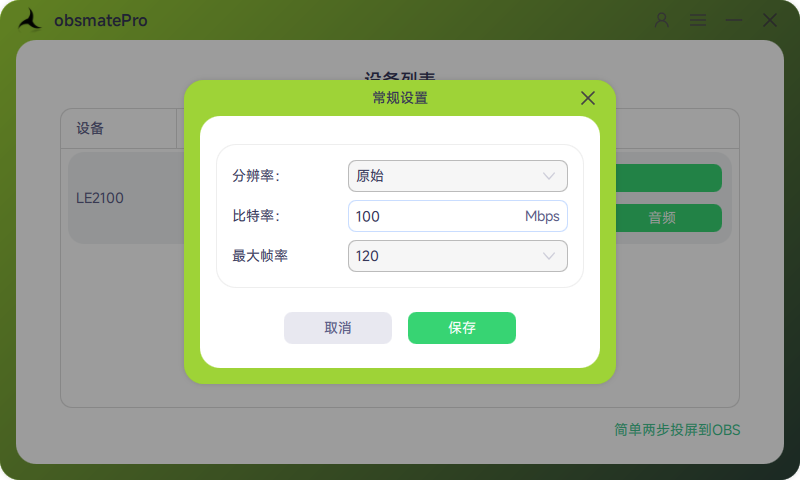
| Setting | For a live stream |
|---|---|
| Resolution | Original. You get 2K only when the phone itself is 2K |
| Bitrate | On a flagship, start at 64 Mbps. If the picture stutters, lower bitrate. Do not raise resolution and bitrate together |
Saved values apply on the next casting session. If a change seems to do nothing, stop the current session and start casting again.
Use USB for a long stream. When Wi-Fi is the better fit is in USB vs Wi-Fi casting for OBS.
Set OBS output to what the platform asks for, often 1080p or 720p. The phone source can be sharper than the outgoing stream. A 2K source does not make viewers receive 2K.
How the picture enters the scene is in Add an Android phone to OBS without window capture. Capture cards and phone audio are in Stream an Android phone in OBS without a capture card.
FAQ
Can every phone use 100 Mbps?
No. 1–100 Mbps is the maximum you are allowed to set. If the phone encoder, the cable, or the PC cannot keep up, the picture stutters. Start a flagship at 64 Mbps and lower it when it does not stay smooth.
Does Original mean 2K?
Original means this phone’s resolution. A 1080p phone casts at 1080p. The cast goes above 1080p only when the phone itself does.
I changed the numbers and nothing happened
Save, end the current session, and start casting again. Settings apply on the next session.
How does this compare with a capture card?
A capture card uses HDMI. This page does not compare devices. Phones without a video-out port are covered as a path in without a capture card.