
A capture card expects HDMI. Many Android phones have no video output, and an adapter then has nothing to carry. This page sends the Android picture and its audio into OBS in software, without a capture card. Delay and sharpness still depend on the phone, the cable, and bitrate. This is not a capture-card review.
Four paths
| Path | What reaches OBS |
|---|---|
| Capture card | The HDMI picture. The phone has to output video |
| Camera-only apps | The lens, not the game on the screen |
| Window Capture | The mirror window on the desktop. It can be covered. See without window capture |
| Media Source | The Mate Code picture, with phone audio sent to the PC on its own |
The quality controls are in Android resolution and bitrate for OBS.
Audio is two different switches
On the device list, click Audio.

- Audio service is the one for game sound. Install the audio component on the phone and grant it. It takes effect as soon as the phone allows it. The PC can hear the phone while the phone speaker still plays.
- Audio forward does not install an app. It has an output mode and a playback mode. The guide marks this one as the usual choice. A checked box applies on the next casting session. Game sound is described on the audio service, so play a short recording before you go live and confirm viewers hear the game, not only your microphone.
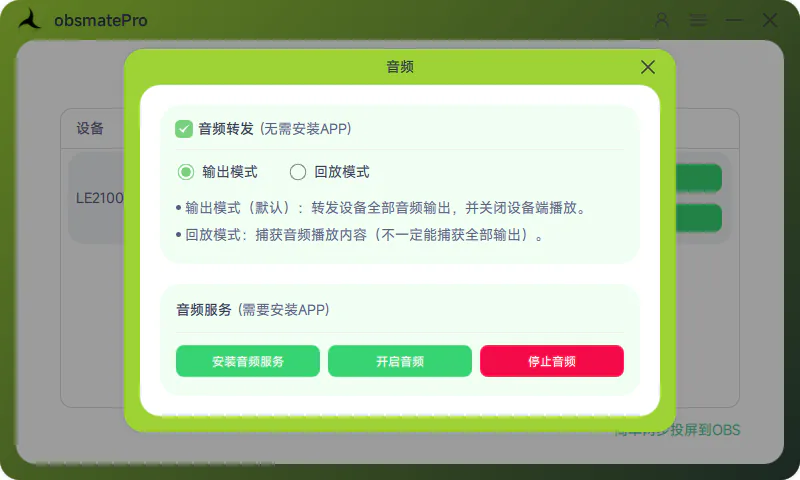
The picture steps stay in Add your phone to OBS with Mate Code. A long stream still prefers USB. See USB vs Wi-Fi.
The platform comes after the scene
Put this source in the same scene as the camera and the alerts, then send OBS to Douyin, Bilibili, Douyu, Twitch, or YouTube. The stream key lives in that platform’s dashboard. This page does not copy it.
FAQ
Can I go live with no HDMI port?
Yes. This path does not need video output. The phone sends the picture to obsmatePro over a cable or Wi-Fi, and OBS takes it as a Media Source.
Viewers cannot hear the game
Check which switch you used. Game sound uses the audio service: install it and grant it on the phone. Audio forward installs nothing, and a checked box waits until you start casting again. The microphone is a separate OBS source. It picks up your voice.
Do I install the audio component every time?
Only the audio service needs it, and only until it is installed. Audio forward does not install an app.
Which of the three pages do I read?
This one picks the path and the audio. Why not to grab the window is the window-capture page. Resolution and bitrate are the quality page.